Showing posts with label ANDROID. Show all posts

Wednesday, 15 February 2017

How to use your Android phone as a microphone

  Android is the worlds most popular OS on mobile platform because of it can be tweaked in different form to give results. Today i will be showing you guys on how to use your android device as a microphone.

  There are so many apps that can be used to make your android device work as a microphone but for the cause of this post, we will be making use of an app produced by Wonder Grace called "microphone"

Also Read: How to create a USB drive that Auto H*ck passwords on any computer system

 This app once installed on your phone, can be used as an alternative when there's no microphone.

Features of the Microphone app:
1. Amplifier
2. Mono/ Stereo (Balance channel individually)
3. Equalizer adjustments
4. Line-in/ Line-Out Selection
5. Sampling rate selection
6. Widget support (lock screen and Re-sizable)
7. Supports locale/ Taker as a plugin

Also Read: How to make free local and international calls!

How to use:
1. First thing to do is establish connection between your speaker and your android device. You can either use a cable for it or connect it using Bluetooth (if the speaker is Bluetooth enabled)
2. Click here to download the microphone app and install 


3. Open the app and then tap on the microphone logo to power the mic on
4. Now speak to the mic to test it to see if its working
5. When you have tested it, you will find out that the sound is either echoing or coming out too sharp
6. This app has configurable options like the equalizer, Phonics and other settings to give you the ideal value that would march what you want.

Sunday, 12 February 2017

How to get round corners on your Android device no root!


  Android phone users love to explore and have something to distinguish their android device from others. Today i will teach you how to have rounded corners on your android device.

 Having rounded corners or curves on your android gives it a sleek and neat look which makes it to stand out different among other android devices. The elegant look of this feature has made Samsung to include it in their up coming Galaxy S8 device. Few years back, the only android device that had rounded corners were those running Xiaomi's MIUI ROM.

Also Read: How To Create A Wi-Fi Hotspot On Your PC Without Router

To get started, simply follow the below procedures and make your Android device have a rounded corner. This simple trick doesnt require root and it wont take you up to 5mins!

Procedures:
1. Click here to download Cornerfly for free

2. Install the app and open it

3. Next enable it to switch to "system overlay"

4. The next step is the "Accessibility Service", locate and select Cornerfly and then "enable" the switch from the top and then press "ok"

5. Now click the back button to take you back to the app and then ensure that the switch in the right corner of the app is enabled.

 Note: Cornerfly by default rounds the corner of just your device at the button background, it does not round the corner of your navigation bar unless you click for it to be done.

6. To enable all your apps to have a curved edge, click the icon at the top right corner of  your screen (while still in the app) and then tick tick "enabled". Remeber to untick "overlay Statusbar" and "Overlay navigationbar"
7. Now exit and see the beautiful new look your phone has acquired.

 Remember to white list the app in your battery saver apps and booster.

Also Read: How to take partial screenshot on your Android device

Wednesday, 8 February 2017

Fire breaks out at factory belonging to the maker of the Samsung Galaxy Note7 battery

  Samsung SDI Co. the company that built the faulty batteries for the Galaxy Note7, said one of its plants in China caught fire.

Also Read: Apple recording huge numbers of exploding iPhones

 The company described the fire incidence as "minor" which the they said was quickly put out. A spokesman told Bloomberg that the fire didn't affect production as it occurred at a waste depository, not a production facility.


 So far the cause of the fire out break is still unknown though there are suggestions that the fire started as a result of discarded batteries at the plant. Pictures flooding China's Weibo social media showed huge plumes of smoke rising from the plant.

 Also Read: North Korean Team rejects Samsung S7 Complimentary gifts at the Olympics Competition

 Last year, Samsung had a disastrous outing with the Galaxy Note7 due to faulty batteries that kept over heating and exploding. In a bid to save its face, Samsung recalled the Note7 devices and had their batteries replaced but still the they kept exploding. Finally, Samsung had to announce a massive recall of all the note7 devices sold. A refund were made to the customers or an option to pick the S7 with a gift from Samsung.

 Samsung inc rued losses in Billions of US Dollars from the failed production of the Note7 which then gave iPhone a slight edge over Samsung as the most sold phone in 2016.

Saturday, 4 February 2017

How to enable guest mode on any android phone


 Your Android device is your personal gadget which holds so many information about you, information which you wouldn’t want not just any body to access.  Some people have this odd habit of trying to access other people’s private contents. Leave them with your device for just 5mins; they would open your WhatsApp, Telegram, messenger and other social media apps on your device and read all the messages. Some might even go the extra mile snooping on other things.  

 
The solution to this is to enable guest mode on your android phone, not minding the version of android phone. This guest mode is similar to the guest mode on PC which you create for visitors accessing your PC. Guest mode enables you to regulate and control what the person other than the owner of the phone can access. Follow the below steps to create guest mode.

Note: Most Android 5+ device has an inbuilt guest mode on their device.

How to create Guest mode on Android:

1. Click here to download the app “Guest Mode
2. Install the app and open it
3. Select the apps that you want your guests to access for a limited period
4. Next, click on the + symbol to sign in.
5. Once you are signed in, you will see the apps that are installed on your device.
6. Now select the ones that you want to protect and then apply.
7. Click on the next arrow and then set your timer.


Users with root priviledge can download Switchme

Tuesday, 3 January 2017

How to send blank messages on your Whatsapp


 I was chatting with someone on WhatsApp when we began to challenge ourselves. He did different tricks and i too challenged him with the ones that i knew but he silenced me when he sent me a blank message and i couldnt repeat or challenge him with something better.
  
 Today i will show you guys this trick on how to send a blank message on WhatsApp. You can use this trick to prank your friends or family members and watch them as they complain that their phone is eating up their WhatsApp messages. Follow the below procedures and enjoy the prank.

Procedures:
1. Click here to download an app called Noword (Android users)
2. Install the app and open it
3. When you open the app, you will see the button that says send
4. Tap on the button and you will be prompted to select the app to send the message. 
5. Now tap on the app you want to if its WhatsApp, SMS or Messenger. Now tap on your WhatsApp and then the app will take you to your WhatsApp contact list.
6. From the list of your WhatsApp contact, select the contact that you want to message and then tap the send button. The person that you sent the message will then receive a notification that there's a new message. When they opens it, the sent message would be blank like no message was sent at all.

 On your own device, the time that you sent the message would still be there with the double mark although they wont turn blue.


Thursday, 29 December 2016

XP Psiphon V.7 for free unlimited internet and Techfoe update


 Its just a few days to 2017 and i believe you all are prepared to enter the new year stronger than the way you entered 2016!
Also Read: Safaricom and Airtel Kenya free internet trick and Raid update

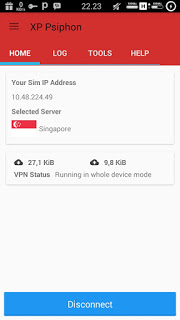
 XP Psiphon version 7 is out and hope those that were having slow internet connection using those free internet trick settings can upgrade to version 7 and enjoy a better speed. Those also using the South African CellC configurations, the Zambian and Tanzania Vodafone configurations too can upgrade to get a better connection due to the new improvement and inclusion of more features.(I will be dropping new settings for V.7 of XP Psiphon)

 If you 'ave noticed you will see that we have added live chat support for those who have questions. This support for now is temporal, we are still testing it and if it doesn't fit what we wanted, we might just remove it.
Also Read: Raid: South African free internet trick and update for CellC and Vodafone

Below is the link and features of the V.7 of XP Psiphon. Update yours because you might not know when the next trick would be knocking on your doorsteps.

XP Psiphon V.7 added Features:
  • New improvements
  • Advanced tethering tool
  • Secured Configuration
  • Fully Materialize
  • Added Server entries
  • Web view ads replaced with banner ads
  • Force stop on API 19+ fixed
  • New Diagnostic tool added
  • New improved UI


Follow us

@Way2themes

Follow Me